Wednesday, June 15, 2016

Project: Preview | RoutaBoard

What's up, everyone? Today I'm reviewing the Routaboard, a new prototyping circuit board by KnivD out of London. Many thanks for the review units he shipped over. You can check him and his Kickstarter out here:


---


Project Preview: Routaboard
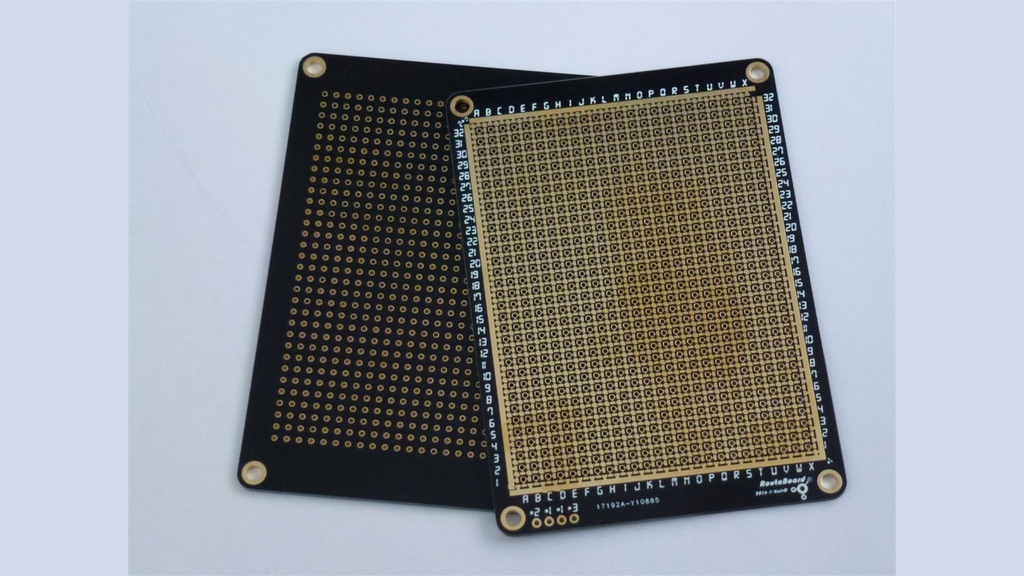

What is Routaboard? It's a really cool device- a blank circuit board with unconnected traces between each of the holes. This means that instead of having to connect your electronic projects together with wires, you can simply add a tiny drop of solder in between the holes you want, thus creating an actually professional-looking prototyping package.

Routaboard also comes with free software called RoutaEdit. It's a simple program that let's you design your projects digitally and figure out where to solder the traces ahead of time.
My review unit came speedily on through, which was nice since it came from overseas. I recieved four boards, (Two standard-sized doubled-sided boards, and two standard-sized singled sided boards.)

The boards look very sleek and professional, with a black finish contrasted by the gold holes and traces. They came without a single scratch or chip, which is very nice.

The Hardware:

The boards are a unique, and yet very smart idea and design. The standard size is 24x32 holes, big enough for most Arduino-type projects. (Or an Arduino shield!)


The traces are a bit confusing at first glance, but open up the RoutaEdit software and they'll make sense. The traces extend in all four directions from each hole, but are seperated from each other by gaps in the metal. The idea behind Routaboard is that you can apply a drop of solder in the gaps in the traces, which eliminates the need for wires in your package. And because there's no need to cut wires, you can use a desoldering tool to remove these solder drops and reuse the boards again and again.

Running along the side of each board is a strip of metal. These connect to the grid of holes and work as the power, ground, and a strip for inputs. (Such as Arduino analog or digital.)
Overall, the system is very handy. It makes prototyping much more minimal and space-conserving, although soldering the traces together may take a little more time. Keep in mind that to use this product to its maximum, you need a soldering iron and at least (some) solder on hand. Although if you're buying this board to begin with, you won't go far without said items.

The Software:

The Routaboard software, RoutaEdit, is... simplistic. I haven't used it for that long, but from what I can tell there... isn't much to do.


That's not to say it isn't helpful; RoutaEdit does give you a visual representation of how the traces work on the Routaboard, and you can use it as a guide while soldering to make sure you solder the correct traces.

The software also lets you add a virtual component to the board; however, the only components available right now are "blank" 1x2 components, DIP8, 14, and 16 parts, and resistors. Nothing else exists... yet.

The software is still in its early stages. As Routaboard continues its campaign and development, more features will be added, including a processing code written specifically for RoutaEdit projects. I can't wait to see what becomes of the program.

Oh, and a quick note: As of this post, RoutaEdit is only available for Windows. So OSX (sorry) macOS users, you may have to wait a bit.


Well, that about sums up the product. Did I convince you to invest in Routaboard? If I did, let me know in the comments below. Or send me your wallet out of gratitude. Either works. And ff you want to spend even more money, consider donating to the SHARD Labs GoFundMe!

-GoFundMe

Later, skaters!

..Carter..

Wednesday, May 11, 2016

Check out the DragonBox Pyra!

Hey guys. Today I've got another cool (and this time, open-source) product, the DragonBox Pyra! (pyra-handheld.com)


It's a portable Linux computer LOADED with special features, all in a clamshell package roughly the size of a DS.

Here's DragonBox's Press Release:.

---


The DragonBox Pyra – a combination of a miniature PC and a video gaming console. Developed together with a large community.
OpenSource, no spy-software included, no registriation necessary. Nothing.
Even the schematics will be made public.
A full-featured Desktop-Linux-PC that fits your pocket, open for everything and everyone. Designed and produced in Europe, avoiding slave labour.
Pre-orders have been coming in since they were made available the 1st of May.
Similar to crowdfunding in nature, but only a downpayment is needed –  and the remainder due when the unit is ready to be shipped.
The minimum order quantity of 500 devices has been funded already.
Next milestone is at 750, which means 1000 can be produced.
To get to this point has taken three years of development.
In February functional prototypes were made, which are thoroughly being tested to make everything ready for mass production and subsequent hands-on within the year.

As a successor to the Open Pandora, the Pyra carries numerous large and small improvements.


Besides updating the specifications to more modern standards, it follows a new concept that no other mobile device to date offers:

The Pyra is small and compact (only 13.9x8.7x3.2 cm), yet extremely modular. Designed to be modular it is user upgradable, both mainboard, displayboard and the one that has the processor and RAM are individual boards.
Designed to be easily repaired or modified - one screwdriver is all you need to take it apart.
Better for everyone and the environment.

Multiple real USB ports, Game-controls, backlit keyboard, replaceable battery, SD-card slots, Wi-Fi and Bluetooth, optional LTE mobile internet and telephony services with GPS and various sensors.

Use it as a desktop PC by connecting a HDMI-cable to a monitor.

The Pyra uses an ARM processor and comes equipped with a Debian GNU/Linux operating system. No accounts or registration is necessary to make this device fully functional, and no ads to be found accompanying the apps.

The Pyra has a large fan base and a community around it that goes far back.
A similar device is not currently available on the market.
---


Quite a mind boggler, eh? It's pretty sweet. 

You can preorder one of these bad boys at the same link at the top of the article, or go 
directly to their preorder page HERE.

Enjoy! We'll continue to cover this amazing product as it continues to be developed.

Until next time,

..Carter..


Wednesday, April 6, 2016

Project: Preview | WeKast Presentation Stick

Hey Folks! Another Project: Preview for you all! Today I'm previewing the WeKast presentation system by the WeKast team out of Tel Aviv. Many, many thanks to those folks for getting me a review unit. You can check them out at the links below:


---


Project Preview: WeKast Stick


So what is WeKast? To quote the Kickstarter, it's the only mobile-based professional presentation solution that completely eliminates the awkward set-up process while increasing mobility and engagement.

...To much for ya, huh? Well, it's essentially a wireless dongle that allows you to display your slideshow, powerpoint, demonstration, etc... directly from your smart device. No cables, laptops, or even WiFi necessary. It's pretty handy for those business meeting presentations where the WiFi just happened to go out- and guess who forgot their HDMI cord?

I got a review unit extremely fast; they informed me that they had shipped the unit on March 22nd, and I recieved the unit just three days later, on the 25th. So kudos to them in the shipping department.

My review unit camed enveloped in a soft velvet bag, secured with drawstrings. Each individual part of the kit had a plastic sleeve protecting it, and the WeKast Stick itself was secured in bubble wrap. So there was no chance of the good ol' USPS busting up this shipment.


I was surprised (in a good way) at how many accessories the review unit came with. Keep in mind, however, that many of these parts will be integrated into the final product and won't actually be included as seperate attachments. But anyway, here's what I got:

-1x WeKast Stick

-1x 6000 mAh Portable Battery

-1x Female/Female HDMI Connector

-1x Female HDMI/Female VGA Adapter

-1x Micro USB Cable

-WeKast and Battery Instruction Manual

A bunch of goodies included. Again, most of this will be integrated into the final product, so you won't need to attach all the external gadgetry. But this is a review unit, so the design and asthetics are NOT final.

The Hardware:


The WeKast is a smooth-looking little stick. Wrapped in matte black plastic, it is sparse of any decoration save the sticker on either side with the WeKast logo. (Actually, there's a enterprise option on the Kickstarter to order WeKasts with your own logo.) The HDMI plug is covered by a plastic cap made of the same material.

To set up my stick, I plugged the WeKast into my TV using the provided HDMI adapter. I then plugged the power pack into the stick via the back microUSB port. As soon as the power is plugged in, the stick automatically boots on.

To me, the WeKast is a pretty well-built product. The casing doesn't feel too flimsy (although I haven't, nor would I recommend, putting a lot of pressure on it.) The need for an external battery limits its potability slightly, but again, this just a TEST model. The stick is powered by a quad-core processor, meaning that your presentation will always be snappy and quick to load.

The Software:


The WeKast software is fairly simple and easy to use. It's built upon Android 4.4, and you'll actually notice this when the Android logo appears momentarily during setup.


In order to use the WeKast, you need three pieces of software to make things happen: First, you'll need a PowerPoint Presentation creation app. (Pretty obvious that you would have one if you're purchasing this device.) Secondly, you need the WeKast add-on button for PowerPoint. This installs into the PowerPoint app, and allows you to convert and send your slides and presentation files to your phone through your phone number. I found this method of file transfer a little odd, but just think of it as texting yourself the files. Finally, you'll need the WeKast app.

The WeKast app is SUPER simple. When you first enter the app, if you don't have any files, there's literally nothing to do or click, beside refreshing the page. (Although I do love the loading screen for the app, with its little flaming-logo animation.)

Once you have some files inside the app, you're ready to hook up to the WeKast stick itself. On Android and Windows Phone, this process automatically happens. On iOS, (I was) it may or may not automatically connect. If it doesn't, you have to go into the Internet Connections setting of your phone and connect to the "WeKast" network.

And now you're ready to rumble! You can load a presentation, set it to auto-scroll through the slides, and even add notes to each slide. It's pretty amazing.

Overall, the WeKast system is an incredibly helpful tool for any business who wants an easy, fluid way to present their information. As the Kickstarter continues and hopefully suceeds, it'll be interesting to see how the WeKast evolves and is formed into an even better product.


And that's the show! Be sure to check out the Kickstarter and donate to that. If you want to spend even more money, consider donating to the SHARD Labs GoFundMe!

-GoFundMe

Otherwise, have a great rest of your April!

..Carter..

Wednesday, March 23, 2016

Don't forget the forums!

Hey guys!

Just a heads-up that there are forums for the SHARD website!

Either use the following link or click the SHARD Forums tab on the top bar.

Thanks! Can't wait to see ya there!

..Carter..

A Change in Social Media Plans...

Hey everybody. I know it's been a little while since the site had any activity, but I just wanted to update everyone on SL's social media presence.

For the entirety of the site's existence, SL has had a large presence on Google+, and that has been mainly it. (Much to the chagrin of some.)

Up until February, we also enlisted Google Friend Connect, a service that allowed people with Twitter, AOL, and various other services to follow the site as well. However, Friend Connect... no longer exists. Well, it does, per say, but it only allows you to connect with Google+... which you can already do through the embedded Google+ tab on the blog.

So here's the role call for SHARD Labs: If you previously used Friend Connect to follow the site, PLEASE switch over and click "Follow" on the Google+ tab.


If you don't have a Google+ account or haven't bothered to follow us in the past... well, do it or suffer the consequences. Just kidding. Maybe.

Ta ta!

..Carter..

Tuesday, March 1, 2016

Review | The Qoo Bracelet

Today's review is the Qoo Bracelet, a nifty transparent form of media sharing brought to you by AC Grindl, the founder of the Colombian-based company. Many many thanks to him for dealing with the import hassles of getting the bracelet to me. 

Check out his website where you can buy one of your own!


Review: Qoo Bracelet


What is the Qoo Bracelet? Simply put, it's "social media you can wear." It's an NFC-equipped, smartphone-connecting wrist band that seamlessly, privately, and instantly lets you share your favorite links, pictures, videos and other forms of social media with anyone else.

Just by holding up your wrist.


HARDWARE:

The Qoo Bracelet is a simple, minamalistic band of rubber with a larger disc of rubber in the middle. This disc contains the pre-programmed NFC chip that will enable you to share with phones.

The band is a smooth white rubber. It feels nice and doesn't pull at your arm hairs as it slides around. There's no connector at the bottom; instead, strips of metal run through the band. These lock into place outward, and then snap into a loop when bent. This makes for a one-size-fits-all fit, which is nice, considering that people's arm vary so greatly in size.

There's not much else to say; the company's Qoo logo is embossed on the top of the circle in pink (or gray, the color I recieved.)

SOFTWARE:


The software that you'll use to upload your media is conveniently powered by Wordpress. In fact, the custom site that the band redirects to is essentially a modified blog. This makes it very easy to upload your pictures and whatnot without worrying about rewriting NFC tags and whatnot.

To begin, you'll need the instructions that came with your Qoo bracelet. These instructions provide the unique alphanumeric code that you'll need to enter into your site in order for your band to direct phones to the site. The Qoo website does contain several video instructions that'll be very helpful during this process.

WARNING: YOU MUST FOLLOW THE INSTRUCTIONS TO THE LETTER. Missing or messing up a step can cause your band to redirect to nothingness instead of the personall media wall. And we don't want that now, do we?

Once you own your custom mini-blog, you'll be able to customize to your heart's content. There are more tutorial videos on how to do this as well. Wordpress has a handy system that categorizes your videos, pictures, links, posts into seperate categories through the help of a static homepage.

This brings me to a small complaint: the upload size. Wordpress has an 8MB file size upload limit, which works fine for most media, but not videos. If you want to upload a video that's larger than that, you're gonna have to provide a link to a YouTube video or file storage site instead.

But the system is very nice overall. There's a plethora of different languages to choose from, so you don't have to worry about what language you speak in order to use the band. The site customizer lets you change the themes, colors, and much more.

Overall, the band is a pretty handy tool that greatly simplifies the media sharing process.

Once again, thanks to AC and if you want to check out (and possibly purchase?) the Qoo Bracelet, head over to the Qoo Shop and pick one up for $6.99.


Keep checking back for more reviews coming soon, and consider supporting the GoFundMe if you like what you see! Until next time,

..Carter..

Monday, February 22, 2016

Project: Preview | RezaNinja Laser Tag

Today's review is a bit of a departure from protocol; I'm actually previewing... a laser tag system? The folks at RezaNinja were nice enough to ship me a review set across the sea (and remarkably quick, at that). 

Many thanks to those guys, who you can check out at the links below:


---

Project Preview: RezaNinja Laser Tag

What is RezaNinja? The company's slogan is "Reza mean laser!" I'll take their word for it. But on a more serious note, this business specializes in cosplay, gaming, and laser tag. The lattermost of which I am reviewing today.

They shipped me a review set remarkably fast; it took less than a week for the shipment to make it overseas from Hong Kong to my house. So kudos to them there.

If you managed to see them at the New York Toy Fair this year, than you probably don't even need to read this review. But since you probably didn't, (I sure wasn't going) keep reading after the break!


The RezaNinja laser tag system is a pretty nice-looking set of gear. And boy, is there a lot of it.


My set included:

-2x Laser Gun/Swords

-2x Point Meter Belts

-2x Foam Shields

-2x Foam Daggers

-2x Foam Throwing Stars

-2x Sword Sheaths

-2x Arm Bands

...That's a lot of stuff. But it's all very nice. The foam accessories don't really do much for the actual game, unless you buy the impact vest which measures physical hits as well. But it's all great for cosplay!

The Hardware:

Let's get into the meat and potatoes of our pie now, however: the RezaSword and Vest. This is what you'll be using to actually play the laser tag game.

THE SWORD/GUN:

The RezaSword is a pretty nice looking piece of equipment. Some Kickstarters I review send products that are still in their prototype stages, and therefore, not as nice or streamlined, but RezaNinja has been working on their system for a while now.


It reminds me a bit of a Wii remote. The device is slightly curved, with a trigger on one side, and fits well enough in your hand to work in either sword or gun mode.
The handgrip is covered by a matte black rubber cover, also a la Wiimote. This covers the battery cover as well as the mode-changing button at one end.

On the front, you'll see a large angled piece of rubber with a hole in the middle. This is the laser part. (This is starting to sound wierd.)

The their are six LEDs on the gun, three on each side, and these blink repeatedly at you as play the game. There's also a rumble motor inside that vibrates whenever you're "hit."
This is all very nice, but it brings me to my first complaint: the sound.

When you first insert the AAA batteries into the remote (WARNING: You're gonna need 12 of these puppies to power the entire set) and hit the switch, the sound system kicks on with some jammin' rock tunes. Nice! Aim and pull the trigger, and you'll here the semi-loud "Pew!" "Pew!" as it fires on the opponent. But switch into sword mode, and you'll be greeted with the EAR-SPLITTING sound of metallic sword blades smashing into each other. And we're talking deafening here. It may be a little better outside, (I haven't tested it outdoors) but then again, your neighbors might just call the cops.

Otherwise, the RezaSword is very nice! For all of its sounds and blinkeys, the pair managed their battery life quite nicely. You'll want some rechargeable batteries for them to help ease your wallet.

THE BELT:

What fun is a laser tag game without a point system? That's what the belt accomplishes with a (somewhat) easy way of keeping track of points.

The belt isn't as nice as the gun, but still accomplished its job pretty well. It has one triangular sensor on the shoulder-region of the fabric, and a point-counter screen on the back strap. This counter goes up with each hit you receive; as opposed to most systems where it shows your points for how much damage you given.

This is where the electronics to the system get a little screwy: To "sync" the belt to your sword, you must point the gun at the belt's sensor and toggle a little plastic switch on the sensor back and forth. This (may) work, at which point the belts' embedded LEDs switch from solid blue to a pulsing green. If it fails, the screen reads: ERROR and explodes.

Okay, so it doesn't explode. But hooking the different peripherals can be quite a pain, especially if you don't have someone else helping.

Overall, the system is pretty fun. You'll want a pretty large area to play in with (preferably) some obsticals to hide behind, but it can be fun in a smaller area, too.

RezaNinja has also announced that they're working on an augumented-reality add-on to the system as well, which will allow users to "unleash secret powers" and fire digital dragons and other things at each other with the help of AR headsets. All this and more they're working on and hope to fund in their Kickstarter. Check it out below!

Well, that's all for this week. Be sure to check out the SHARD Labs GoFundMe...

-GoFundMe

...and if you like what you've read, consider donating a buck or two. (Or five hundred, if you're Bill Gates. I know you're reading this, man.)

Otherwise, keep your eyes peeled for the next review. Have a great week!


..Carter..